
Source control
The source-control sidebar keeps the repository record beside the sessions changing it.
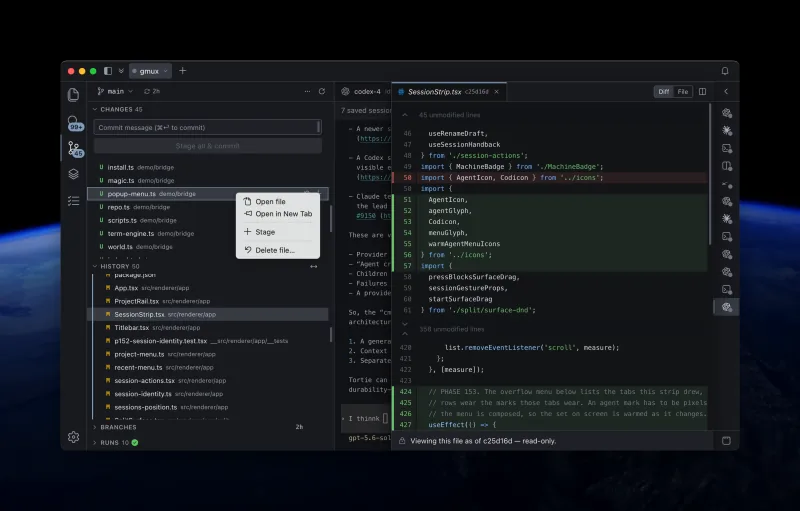
Review and stage changes
Tortie groups merge changes, staged files, modified files, and untracked files. Select a file and press Enter to open its diff.
- Press Space or S to stage or unstage the selected change.
- Use ⌘Enter to commit staged work from the commit box.
- Tortie uses a temporary message file so multiline messages, hooks, and signing behave like normal Git.
- Discarding a change is treated as irreversible and always asks for confirmation.
Choose how a diff is drawn
Every diff carries a row of controls at its head, wherever you opened it from. Inline chooses how much of a changed line is picked out inside the row: Off marks the row and nothing inside it, Words picks out each changed word, Phrases picks out a run of changed words as one, and Characters picks out only the characters that differ.
The paint control beside it turns the full-width colour on a changed row on or off. The change bars and the inline marks stay either way, so the diff still says which side is which.
Work with branches
The branch control shows upstream state and ahead or behind information. You can create, check out, delete, fetch, pull, push, publish, and synchronize branches.
Inspect history
History combines a commit list with a branch graph. Open a commit to inspect its message, references, changed files, and per-file diffs. Scope history to the repository, a folder, or a file when you need a narrower record.
Right-click a commit to open all its changes, open it on GitHub, check it out detached, create a branch or tag, cherry-pick it, or copy its full ID and message. Tortie only shows actions supported by the current repository and installed Git capabilities.
Follow one file back through its renames
Right-click a file and choose History, or use View then File History, to see every commit that touched the file you have open, followed back through the names it used to have. Choosing a row shows that commit's change to the file.
A field at the head of the History section narrows the commit list as you type. A bare word searches messages, and author:, message:, commit: and file: narrow further.
change: searches inside the changes themselves rather than the messages. It waits for you to press Search, because it is slow on a large repository.
Use source-control menus
| Subject | Available actions |
|---|---|
| Changed files | Open a diff, stage or unstage, discard with confirmation, reveal the file, and copy paths. |
| Local branches | Check out, compare, publish, pull, push, synchronize, rename, or delete when the repository state permits it. |
| Remote branches | Check out a local tracking branch and compare against the current branch. |
| Git remotes | Copy fetch and push URLs. |
| History commits | Open changes, use GitHub, branch, tag, cherry-pick, and copy commit details. |
Read GitHub Actions runs
If the GitHub CLI is installed and authenticated for github.com, Tortie adds a Runs section to Source Control for repositories with a GitHub remote. It starts collapsed and does not ask GitHub for anything until you expand it.
- See the latest workflow runs for the current branch and its newest commit, including status, conclusion, trigger, age, and duration.
- Expand a run to inspect its jobs and steps. Hover for its branch or tag, trigger, start time, duration, and cached job summary.
- Refresh on demand, open a run or job on GitHub, or copy its URL.
- After the section has been opened, Tortie notices a push and follows the runs started by that commit without turning failures into app notifications or session status.
Every GitHub CLI command in this feature is read only and names the repository explicitly. Tortie permits only gh auth status, gh run list, and gh run view with a fixed set of fields. It refuses any other GitHub CLI command before starting a process.
Tortie uses your Git
Tortie runs your system Git command-line tool instead of embedding a separate Git engine. That keeps your existing configuration, credentials, hooks, signing, and repository behaviour in charge. Background reads set GIT_OPTIONAL_LOCKS=0 so refreshes do not lock the repository.
Changed files and commits open in Pierre Diffs, a purpose-built, virtualized diff surface with split and stacked layouts and syntax-aware highlighting.