
Attention and Catch Me Up
Tortie keeps routine work quiet. It raises the sessions that need a person and preserves the rest until you return.
Find what needs you
Press ⌘J to open a cross-project list of sessions waiting for human input. The newest request appears first.
- Each row names the agent, session, machine, and project path.
- A recent terminal excerpt helps you recognise the request.
- Use the arrow keys to move and Enter to jump to the live session.
- The menu-bar indicator stays quiet unless a session is blocked on a person.
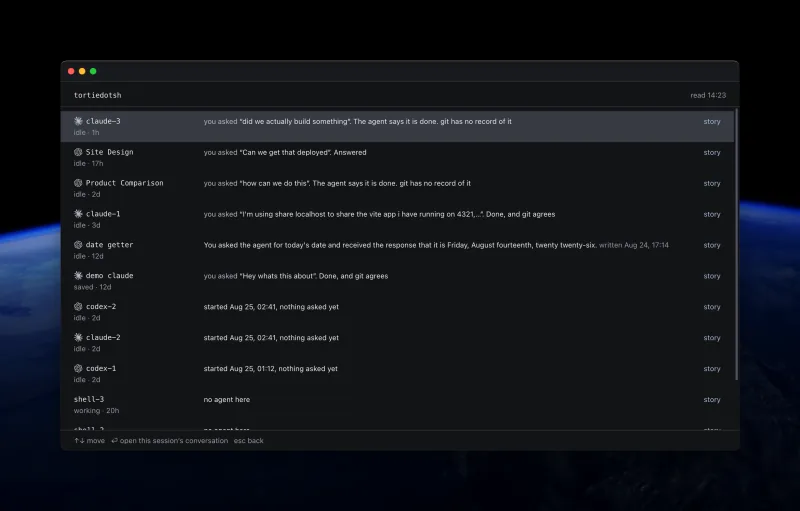
Review conversations with Catch Me Up
Press ⇧⌘U to open Catch Me Up for the active session, the sessions in a split, or the whole project. It reads your asks and each available agent answer from the agent's own log.
- The session view includes a rail of your asks. Use the arrow keys to move between exchanges.
- Press Return on an exchange to jump back to that point in the live session.
- Project rows can compare file claims with the current Git state.
- Gemini currently supplies your asks but not agent answers because its log does not record them in the required form.
Model-written summaries are optional
By default, Tortie builds the project overview without calling a model. You can choose an agent and model in Settings to write one short line after a turn finishes.
Orientation without supervision
Catch Me Up opens only when you ask. It does not create a live activity feed, progress score, or supervisor console. The goal is to return without reconstructing the work from terminal scrollback.