
Settings and customization
Press ⌘, to open Settings. Tortie keeps routine choices together and makes actions with wider consequences ask for explicit agreement.
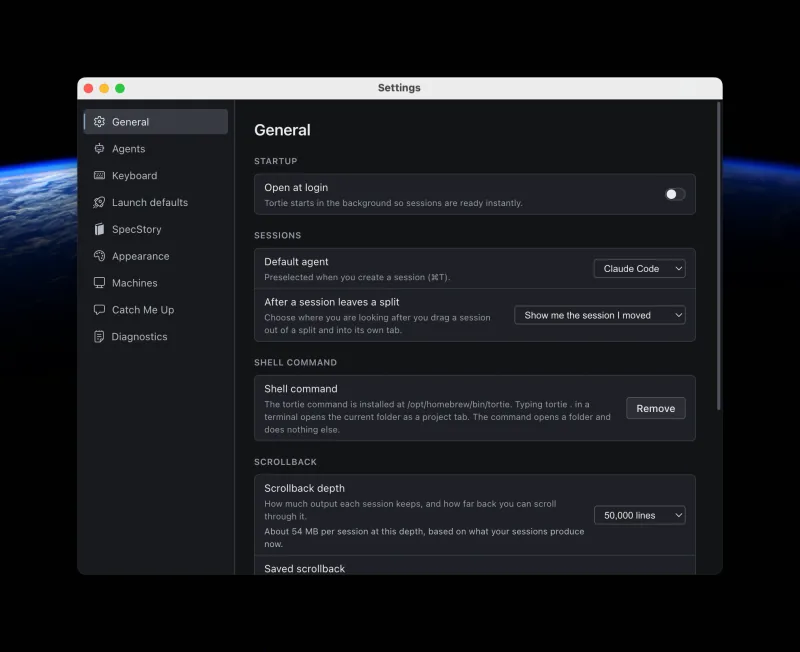
Find the setting you need
| Section | What it controls |
|---|---|
| General | Open at login, default agent, split-exit focus, the optional tortie shell command, updates, live scrollback, and saved scrollback. |
| Agents | Installed-agent detection on this Mac and configured machines, version and path details, custom definitions, re-scan, and the Claude and Codex usage meters. |
| Keyboard | The complete built-in keymap and your per-agent new-session shortcuts. |
| Launch defaults | Per-agent launch flags applied to each new session, and the shell variables your agents are given — named once for every agent, or per agent. |
| SpecStory | Local conversation capture defaults and optional SpecStory Cloud sign-in. |
| Appearance | Highlight colour, contrast, and the terminal and editor font, including a family of your own. |
| Machines | SSH connections, keys, remote capabilities, agent availability, and the one approved write root per machine. |
| Catch Me Up | The optional agent and model that write one-line project summaries. |
| Architecture | The switch that shows Architecture at all, and the agent and model that fill in a contract. |
| Diagnostics | Temporary debug logging and a readable support report. |
Configure agents and launches
Agents shows what Tortie can actually launch on each machine. Re-scan after installing or updating a CLI. A missing agent keeps its installation command visible for you to copy; Tortie does not run it automatically.
Launch defaults are preselected in the new-session sheet. Turning off one option there changes only that session. Options marked as dangerous can only become defaults after you confirm them in Settings; editing the settings file alone does not bypass that agreement.
Launch defaults is also where you name the shell variables your agents need — an API key for a provider, say. Name them once under Every agent and every agent Tortie launches gets them, including agents you install later. Each agent's card says what it inherits, and you can still name variables on a single agent's card when you want that one to have more.
The list offers the names your own shell exports, so you pick rather than type. It scrolls, filters as you type, and takes several names in one go under one confirmation. A name your shell does not export yet is accepted too, so you can add it before you add the key.
The Keyboard section lets you record a dedicated new-session shortcut for an agent. Tortie's built-in shortcuts are fixed in the current release.
See how much of your plan is used
A usage meter sits at the foot of the session dock, on the collapsed rail, and at the control end of the top strip. It reads the login your agent already stored on this Mac, asks that vendor how much of your plan you have used, and draws the last five hours and the week beside a bar.
Claude and Codex are the only providers Tortie can read, and each one stays off until you turn it on in Settings, then Agents, then Usage. While a meter is off nothing is read and nothing is sent.
- Hover a meter for both windows in full, when each one resets, and the plan the login is on.
- Bar shows chooses which window the bar fills to: the last five hours, this week, or whichever window is further along.
- A meter asks again every fifteen minutes, and only while the Tortie window is in front. The refresh control asks now.
- A provider that reports only one window draws that number whichever choice you made.
Keep more than one account
You can add a second Claude or Codex account and choose which one a session runs under, from the usage meter or from Settings, then Agents. Adding one opens a session running the vendor's own sign-in. Tortie never asks you for a password or a token.
Each login is drawn as the account it is, by email address, with your own sign-in marked as the one Tortie does not own.
An account you have signed into is one you can go back to. Switch away, or sign in as somebody else inside a session with the vendor's own /login, and the account you left is still on the list and one click away. Tortie notices that sign-in the moment it finishes and refreshes the card, the menu, the list and the meter on their own.
Choosing another account reaches a session that is already running. Claude Code picks the change up by itself within about half a minute, and Restart now beside the card restarts the session with its conversation kept if you want it at once.
Choose live and saved scrollback
Scrollback depth controls how much output each live local session keeps in the private tmux server. Saved scrollback controls how much bounded output Tortie writes into a recovery snapshot for a restart or reboot.
Change appearance and text size
Tortie can sit on paper as well as on graphite. Appearance offers Light, Dark or Match the Mac, and the terminal, the editor, the diff view, the Architecture map and the window itself all follow. Switching is a crossfade, and it is instant if you have reduced motion turned on.
The frame around your work takes a colour of your own. Eight named colours are each drawn as the frame it will produce. Beside them, Shade moves the whole frame darker or lighter and Depth sets how far the panels and hairlines stand apart from the background.
Appearance also changes the highlight scheme, interface contrast, and work-area font. Font size is contextual instead of global: ⌘+, ⌘-, and ⌘0 change the focused terminal, sidebar, or editor. Use ⇧⌘0 to reset every region.
The terminal and the editor share one font. Choose System, which is Menlo, or one of the two bundled faces, JetBrains Mono and Source Code Pro. Choose Custom to type the name of any family installed on your Mac: Tortie suggests the families you actually have, says when a family is not installed on this Mac, and applies the change at once with Menlo underneath as the fallback. Your choice covers the terminal and the editor only: the sidebar and the rest of the app keep the face they already had.
Keep capture and summaries optional
SpecStory can save supported agent conversations as Markdown inside each project's .specstory/history folder. Nothing is uploaded to SpecStory Cloud unless you sign in. Capture defaults vary by agent and can be switched off.
Catch Me Up does not need a model for its conversation views. The separate one-line project summary writer stays off until you choose both an agent and one of its measured model recipes.
Update Tortie without stopping your sessions
Signed packaged builds check for an update 30 seconds after Tortie starts, then every 6 hours while it remains open. Downloads happen in the background. A routine check failure is logged instead of interrupting your work.
Tortie only says an update is ready after the macOS updater has verified and staged it. Open the update ring and choose Restart and update now or Install when you quit. Tortie never restarts itself without your choice.
- Use Tortie > Check for Updates when you want to check manually.
- Development builds do not update themselves.
- Live local sessions stay in the private tmux server while the app updates and reconnect when Tortie opens again.
- If installation fails, the next launch explains the problem and offers repair. Repair Updates appears only when it is needed.
Collect diagnostics when something fails
Diagnostics can enable extra logging until Tortie quits. It switches itself off at the next launch. Copy support report creates plain text containing the boot snapshot, recent log lines, and crash-dump list so you can inspect it before sharing.