
Session tools and menus
Right-click the thing you are working with. Tortie uses native macOS menus and changes the available actions to match that surface and its current state.
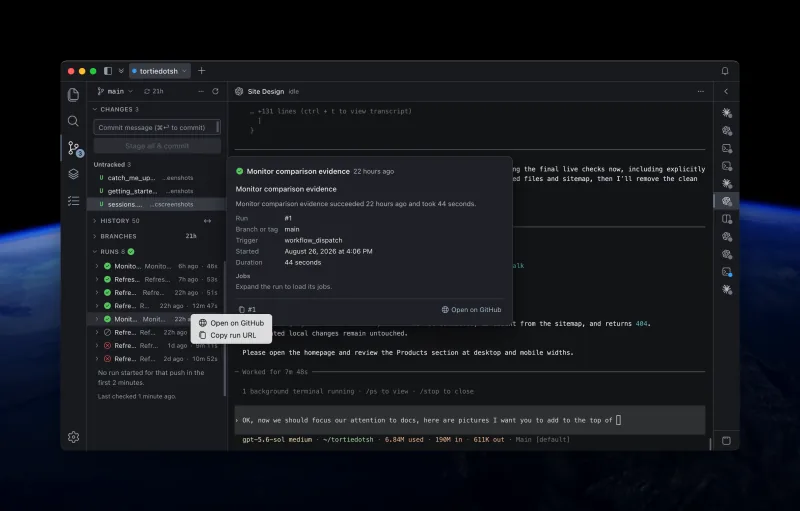
Menus follow the surface
Context menus are part of the main workflow. A session row, terminal, file, editor tab, search result, branch, and commit each open a menu for that exact object. Disabled or absent actions reflect the current selection, connection, and safety boundary.
Manage a session from its row
Right-click a session name or use its trailing actions button. The menu changes when the session is live, ended, saved, remote, or temporarily unreachable.
- Rename the session without changing the running process.
- Restore a saved session or restart an ended local session.
- Read what the session loaded, open saved output, or open Catch Me Up for that session.
- Review changes made by a session on another machine when that machine is answering.
- Copy the session's working-directory path.
- End a live session or remove an ended record. Both actions ask before changing anything.
See every session in one place
Session > Manage Sessions… opens one sheet over every session Tortie is running, across every project and every machine — including projects whose tab you have closed. It is the place to find a session you have lost track of, and to clear out the ones you are finished with.
Each row carries the session's state, the folder it runs in, when it was created, how many messages its conversation holds, and how long ago the last one arrived. Sort by any of those, filter by project or by state, or search by name. Before the state filter, All, Active and Ended answer the simpler question on the face: Active is every session that is alive, including one Tortie cannot reach this moment, and Ended is every session you can restore.
- End a live session, or restore a saved one, from its own row.
- Tick several rows and end them together. Tortie names every session in the confirmation and reports the outcome row by row.
- Rename a session, open its saved output, or read why a restore is unavailable.
- Switch to the Past tab for sessions you have removed, newest first. Session > Past Sessions… opens the sheet on that tab directly.
Use the terminal menu
Right-click inside a live session to open terminal actions. The menu keeps selection-sensitive actions disabled until text is selected.
| Action | What it does |
|---|---|
| New Session or Split Session | Starts another session or creates one beside the current session. |
| Copy or Copy as HTML | Copies selected terminal text as plain text or styled HTML. |
| Paste and Select All | Pastes into the session or selects the visible terminal output. |
| Capture Screen | Copies the visible terminal as an image and offers a save action. |
| Capture Selection | Captures only the selected terminal region. |
| Capture Last 250 or 1,000 Lines | Reads recent history from the local private tmux server. |
| Read Last Lines | Reads recent output from a session on another machine without writing there. |
| Clear | Clears the visible screen and server-side history. The agent keeps running. |
When available, the menu also shows how much scrollback that one session currently holds. Tortie reads the figure only when you open the menu; it does not turn memory use into a dashboard.
The terminal surface combines xterm.js for terminal rendering with node-pty for a real pseudoterminal. Tortie's private tmux server owns the durable session, so closing the Electron window does not end the process.
Click a file an agent names
A file named in a session is a link. Point at it and it underlines, and click it to open it where it belongs: prose and code in the editor, a picture in the image view, and a PDF in whatever your Mac opens PDFs with. A web address opens in your default browser.
- An absolute path, anywhere on this Mac.
- A path relative to the project, opened under the project that session is in.
- A bare filename such as
README.mdorMakefile, opened under the project that session is in. A name that matches no file there underlines nothing. - A path with its line written the way tools write it, such as
path:12, grep'spath:12:or a compiler'spath(12,34). Only the path and its line are underlined, never the text after them.
Arrange sessions without restarting them
Drag one session onto another to make a split, or use a session menu to open it to the left, right, top, or bottom of the active surface. A surface can hold up to 6 sessions.
- Rename the focused session in a split group.
- Break a group back into independent session tabs.
- End all live sessions in a group after one confirmation.
- Use ⌘⌥← and ⌘⌥→ to move between panes.
Find actions where the object lives
| Surface | Useful context-menu actions |
|---|---|
| Project tab | Close the project tab without ending its sessions. |
| File tree | Open, keep in a new tab, open with another app, create, rename, duplicate, move to Trash, reveal, and copy paths. |
| Editor tab | Close this or other tabs, keep a preview open, copy paths, and reveal the file in Finder. |
| Search result | Open a preview or new tab, expand matches, copy matching lines, and copy paths. |
| Source-control file | Open the diff, stage or unstage, discard after confirmation, and copy paths. |
| Branch or remote | Check out, create, delete, publish, compare, and copy remote URLs when those actions apply. |
| Commit | Open changes, open on GitHub, check out, branch, tag, cherry-pick, or copy the commit ID and message. |
| Context entry | Open its source, reveal it, copy details, check an MCP connection, or manage a user-owned skill. |
Destructive actions stay explicit
- Ending a session saves available recovery material before stopping the process and always asks first.
- Moving local files to Trash is recoverable and asks before acting.
- Discarding Git changes cannot be undone, so Tortie confirms the exact selection.
- Remote file deletion is not offered because it would not have the local Trash as a recovery path.